Performance
L7 traffic indexing requires significant CPU and memory resources to process and analyze network traffic in real-time. Understanding performance characteristics helps optimize Kubeshark for your environment.
Resource Consumption
Real-time traffic indexing accounts for most of Kubeshark’s resource usage. Traffic capture itself remains comparatively lightweight—parsing operations consume far more compute than the initial packet capture phase.
| Operation | CPU Usage | Memory Usage | Where |
|---|---|---|---|
| Raw Capture (L4) | Low | Low | Production |
| Real-time Traffic Indexing (L7) | High | High | Production |
| Delayed Traffic Indexing | Low (configurable) | Low (configurable) | Non-production |
Raw Capture vs Real-Time Indexing
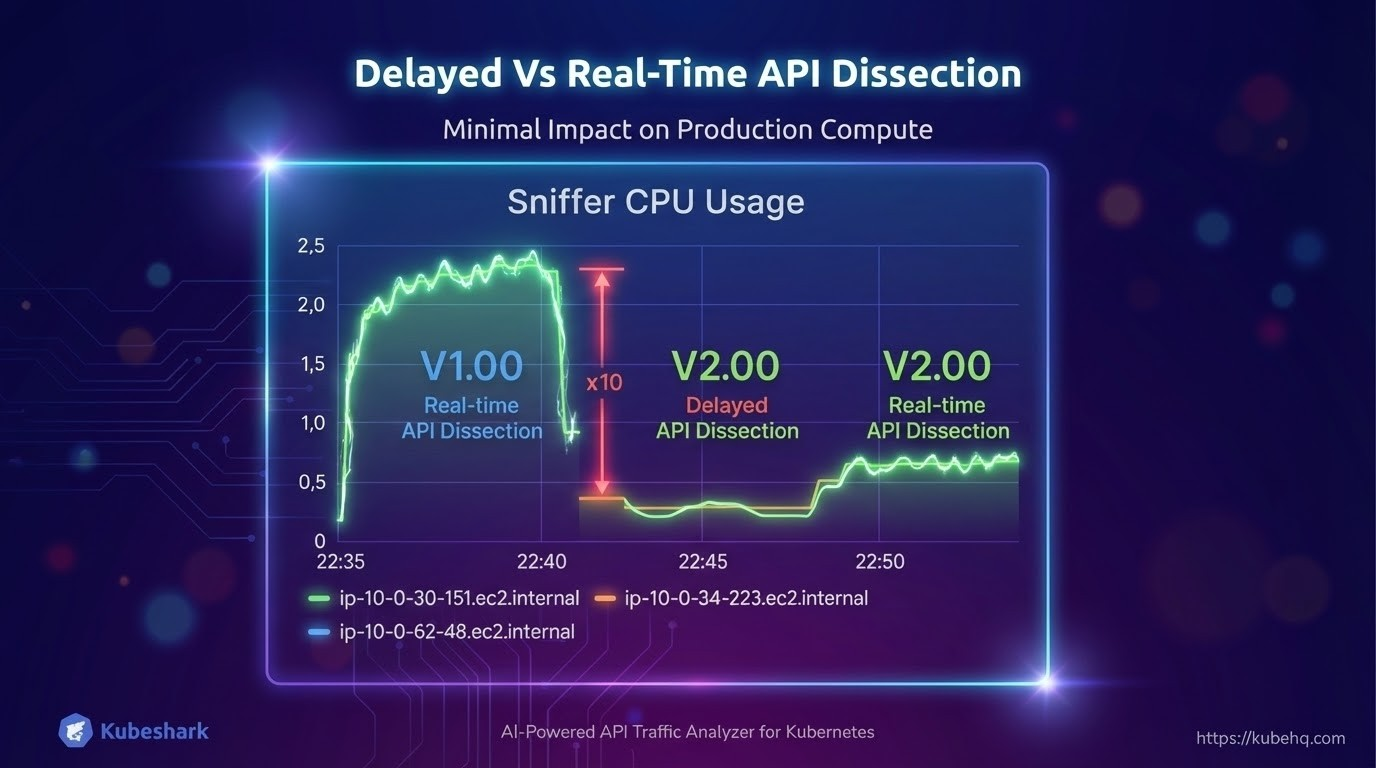
Most of the heavy lifting in V2.00 involves writing data to disk, which is far less resource-intensive than real-time parsing. This is why Raw Capture can run continuously with minimal impact, while real-time indexing should be enabled on-demand.
- Raw Capture - Primarily disk I/O, minimal CPU
- Real-time Indexing - CPU and memory intensive parsing operations
Delayed Indexing
To minimize production impact, V2.00 introduces delayed traffic indexing. Indexing is executed on non-production compute resources with low, configurable resource consumption.
This enables:
- Continuous lightweight capture on production nodes
- Indexing processing on non-production compute with configurable resources
- Real-time indexing enabled on-demand only when needed for investigation
Reducing Resource Consumption
Automatic Indexing Timeout
To preserve resources, L7 traffic indexing automatically stops after a configurable idle period (default: 5 minutes). This behavior can be overridden. See Enabling / Disabling L7 Traffic Indexing for details.
Disable Indexing
Disable L7 traffic indexing entirely using tap.capture.dissection.enabled=false. Indexing can be enabled on-demand when needed:
tap:
  capture:
    dissection:
      enabled: false
Use Capture Filters
Reduce the number of targeted workloads using Capture Filters to lower resource consumption:
tap:
  regex: "frontend-.*"
  namespaces:
    - production
Run Raw Capture Only
Let Raw Capture run continuously while keeping indexing disabled:
tap:
  capture:
    dissection:
      enabled: false        # Indexing disabled
    raw:
      enabled: true         # Raw capture active
This provides complete traffic history with minimal overhead, enabling indexing only when investigation is needed.