KFL Reference

KFL (Kubeshark Filter Language) is the query language used across Kubeshark — the dashboard, MCP, and API all return results matching KFL queries. It uses Common Expression Language (CEL) to query traffic with Kubernetes, API, and network semantics.

KFL queries affect what traffic is returned from the indexed database. They do not impact which traffic is captured. For controlling what traffic is captured, see Capture Filters.

Using KFL

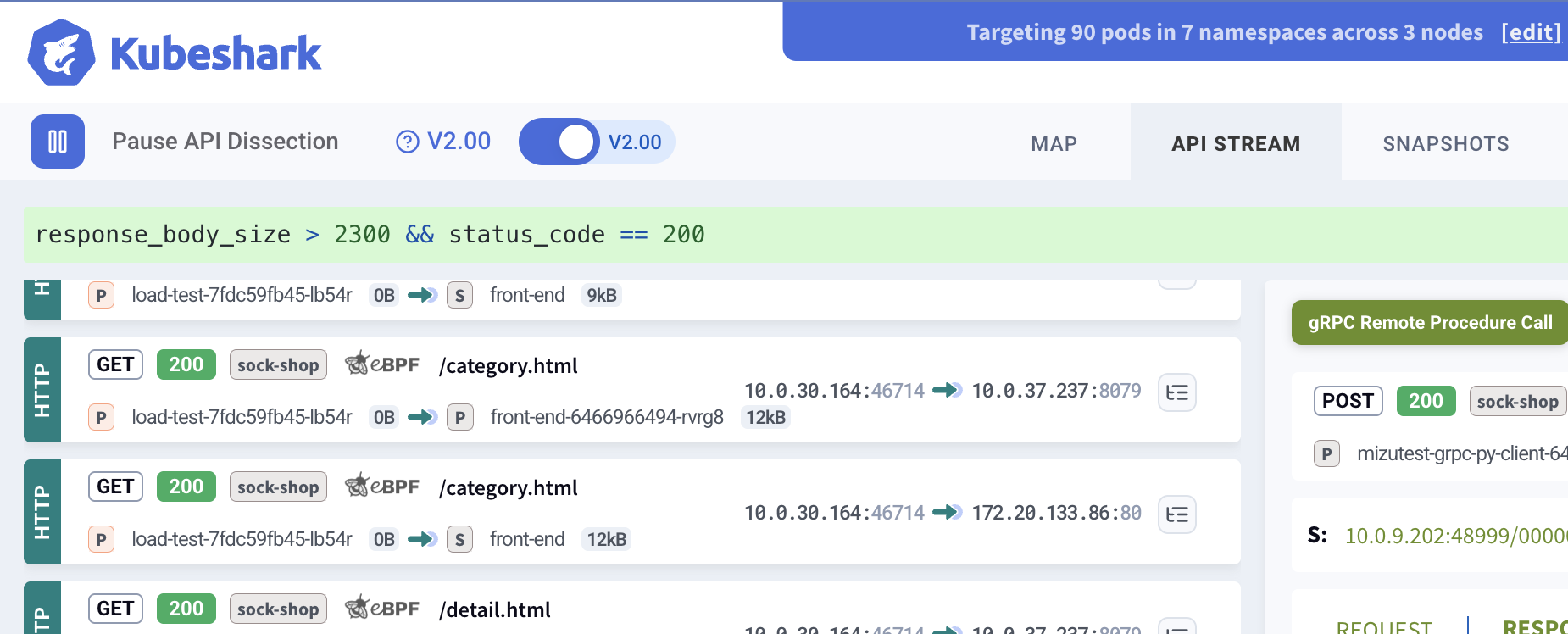
In the dashboard, enter a KFL expression in the query input box:

KFL Query Input

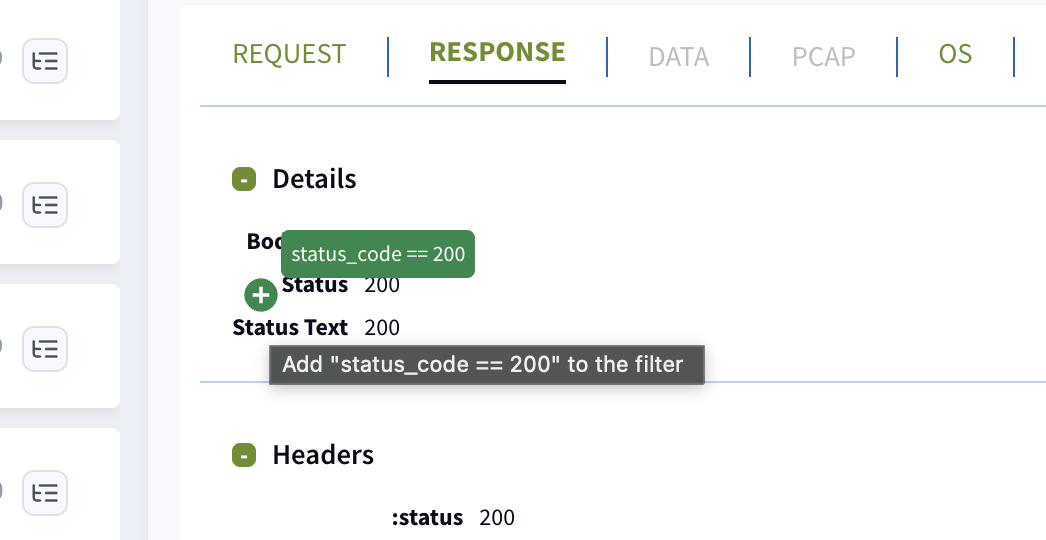
Every element visible in the dashboard has a green + button that can be clicked to automatically add query expressions — helping build complex queries without typing.

Click to Add Query

KFL queries also work via MCP (for AI agents) and the API, using the kfl parameter.

Quick Examples

# HTTP GET requests with errors
http && method == "GET" && status_code >= 400

# Traffic to a specific namespace
dst.pod.namespace == "production"

# DNS queries for specific domains
dns && "google.com" in dns_questions

# Large HTTP responses
http && response_body_size > 10000

# Failed gRPC calls
grpc && grpc_status != 0

# Slow requests (over 5 seconds)
http && elapsed_time > 5000000

# Recent traffic (last 5 minutes)
timestamp > now() - duration("5m")

Operators

CategoryOperators
Comparison==, !=, <, <=, >, >=
Logical&&, ||, !
Arithmetic+, -, *, /, %
Membershipin
Ternarycondition ? true_val : false_val

String Functions

FunctionDescription
str.contains(substring)Substring search
str.startsWith(prefix)Prefix match
str.endsWith(suffix)Suffix match
str.matches(regex)Regex match (RE2 syntax)
size(str)String length

Collection Functions

FunctionDescription
size(collection)List/map/string length
key in mapKey existence check
map[key]Value access (errors if key missing)
map_get(map, key, default)Safe access with default value
value in listList membership

Time Functions

FunctionDescription
timestamp("2026-03-14T22:00:00Z")Parse ISO timestamp
duration("5m")Parse duration string
now()Current time (snapshot at filter creation)

Supported Variables

Network-Level Variables

VariableTypeDescriptionExample
src.ipstringSource IP address"192.168.1.1"
dst.ipstringDestination IP address"10.0.0.1"
src.portintSource port number8080
dst.portintDestination port number80
protocolstringDetected protocol type"HTTP", "DNS", "TCP"

Kubernetes Variables

VariableTypeDescription
src.pod.namestringSource pod name
dst.pod.namestringDestination pod name
src.pod.namespacestringSource pod namespace
dst.pod.namespacestringDestination pod namespace
src.service.namestringSource service name
dst.service.namestringDestination service name
src.service.namespacestringSource service namespace
dst.service.namespacestringDestination service namespace
namespaces[]stringAll namespaces involved (src + dst)
pods[]stringAll pod names involved (src + dst)
services[]stringAll service names involved (src + dst)
node_namestringNode name
node_ipstringNode IP address
local_node_namestringNode name of local peer
remote_node_namestringNode name of remote peer

Pod fields automatically fall back to service data when pod info is unavailable — dst.pod.namespace works even when only service-level resolution exists.

Labels and Annotations

VariableTypeDescription
local_labelsmapK8s labels of the local peer
local_annotationsmapK8s annotations of the local peer
remote_labelsmapK8s labels of the remote peer
remote_annotationsmapK8s annotations of the remote peer
local_process_namestringProcess name on the local peer
remote_process_namestringProcess name on the remote peer

Always use map_get() for labels and annotations — direct access like local_labels["app"] errors if the key doesn’t exist:

map_get(local_labels, "app", "") == "checkout"
map_get(remote_labels, "version", "") == "canary"
"tier" in local_labels

DNS Resolution

VariableTypeDescription
src.dnsstringDNS resolution of the source peer’s IP
dst.dnsstringDNS resolution of the destination peer’s IP
dns_resolutions[]stringAll DNS resolutions from both peers (deduplicated)

Resolution Status

VariableTypeValues
local_resolution_statusstring"" (resolved), "no_node_mapping", "rpc_error", "rpc_empty", "cache_miss", "queue_full"
remote_resolution_statusstringSame as above

Protocol Detection

Boolean variables that indicate which protocol was detected. Use these as the first filter term for best performance.

VariableProtocolVariableProtocol
httpHTTP/1.1, HTTP/2redisRedis
dnsDNSkafkaKafka
tlsTLS/SSLamqpAMQP
tcpTCPldapLDAP
udpUDPwsWebSocket
sctpSCTPgqlGraphQL (v1 + v2)
icmpICMPgqlv1 / gqlv2GraphQL version-specific
grpcgRPC over HTTP/2conn / flowL4 connection/flow tracking
radiusRADIUStcp_conn / udp_connTransport-specific connections
diameterDiametertcp_flow / udp_flowTransport-specific flows

Identity and Metadata Variables

VariableTypeDescription
idintBaseEntry unique identifier
node_idstringNode identifier (assigned by hub)
indexintEntry index for stream uniqueness
streamstringStream identifier (hex string)
timestamptimestampEvent time (UTC), use with timestamp() function
elapsed_timeintAge since timestamp in microseconds
workerstringWorker identifier

Cross-Reference Variables

VariableTypeDescription
conn_idintL7 to L4 connection cross-reference ID
flow_idintL7 to L4 flow cross-reference ID
has_pcapboolWhether PCAP data is available for this entry

Capture Source Variables

VariableTypeDescriptionValues
capture_sourcestringCanonical capture source"unspecified", "af_packet", "ebpf", "ebpf_tls"
capture_backendstringBackend family"af_packet", "ebpf"
capture_source_codeintNumeric enum0=unspecified, 1=af_packet, 2=ebpf, 3=ebpf_tls

HTTP Variables

VariableTypeDescription
methodstringHTTP method (GET, POST, PUT, DELETE, PATCH)
urlstringFull URL path and query string
pathstringURL path component (no query)
status_codeintHTTP response status code
http_versionstringHTTP version
query_stringmapURL query parameters
request.headersmapRequest headers
response.headersmapResponse headers
request.cookiesmapRequest cookies
response.cookiesmapResponse cookies
request_headers_sizeintRequest headers size in bytes
request_body_sizeintRequest body size in bytes
response_headers_sizeintResponse headers size in bytes
response_body_sizeintResponse body size in bytes

GraphQL requests have gql (or gqlv1/gqlv2) set to true and all HTTP variables available.

gRPC Variables

gRPC traffic is detected as a sub-protocol of HTTP/2. When grpc is true, all HTTP variables are also available.

VariableTypeDescription
grpc_methodstringgRPC method name extracted from the :path trailing segment (e.g. /helloworld.Greeter/SayHelloSayHello)
grpc_statusintgRPC status code from the Grpc-Status response header/trailer (defaults to 0 / OK when absent)

DNS Variables

VariableTypeDescription
dns_questions[]stringDNS question domain names
dns_answers[]stringDNS answer domain names
dns_question_types[]stringRecord types (A, AAAA, CNAME, MX, TXT, SRV, PTR)
dns_requestboolIs DNS request
dns_responseboolIs DNS response
dns_request_lengthintDNS request size in bytes
dns_response_lengthintDNS response size in bytes
dns_total_sizeintSum of request + response sizes

TLS Variables

VariableTypeDescription
tls_summarystringTLS handshake summary
tls_infostringTLS connection details
tls_request_sizeintTLS request size in bytes
tls_response_sizeintTLS response size in bytes
tls_total_sizeintSum of request + response sizes

TCP Variables

VariableTypeDescription
tcp_methodstringTCP method information
tcp_payloadbytesRaw TCP payload data
tcp_error_typestringTCP error type (empty if none)
tcp_error_messagestringTCP error message (empty if none)

UDP Variables

VariableTypeDescription
udp_lengthintUDP packet length
udp_checksumintUDP checksum value
udp_payloadbytesRaw UDP payload data

SCTP Variables

VariableTypeDescription
sctp_checksumintSCTP checksum value
sctp_chunk_typestringSCTP chunk type
sctp_lengthintSCTP chunk length

ICMP Variables

VariableTypeDescription
icmp_typestringICMP type code
icmp_versionintICMP version (4 or 6)
icmp_lengthintICMP message length

WebSocket Variables

VariableTypeDescription
ws_opcodestringOperation code: "text", "binary", "close", "ping", "pong"
ws_requestboolIs WebSocket request
ws_responseboolIs WebSocket response
ws_request_payload_datastringRequest payload (safely truncated)
ws_request_payload_lengthintRequest payload length in bytes
ws_response_payload_lengthintResponse payload length in bytes

Redis Variables

VariableTypeDescription
redis_typestringRedis command verb (GET, SET, DEL, HGET)
redis_commandstringFull Redis command line
redis_keystringThe Redis key (truncated to 64 bytes)
redis_request_sizeintRequest size in bytes
redis_response_sizeintResponse size in bytes
redis_total_sizeintSum of request + response sizes

Kafka Variables

VariableTypeDescription
kafka_api_keyintKafka API key number
kafka_api_key_namestringHuman-readable API operation (PRODUCE, FETCH)
kafka_client_idstringKafka client identifier
kafka_sizeintMessage size
kafka_requestboolIs Kafka request
kafka_responseboolIs Kafka response
kafka_request_summarystringRequest summary/topic
kafka_request_sizeintRequest size in bytes
kafka_response_sizeintResponse size in bytes

AMQP Variables

VariableTypeDescription
amqp_methodstringAMQP method name ("basic.publish", "channel.open")
amqp_summarystringOperation summary
amqp_requestboolIs AMQP request
amqp_responseboolIs AMQP response
amqp_request_lengthintRequest length in bytes
amqp_response_lengthintResponse length in bytes
amqp_total_sizeintSum of request + response sizes

LDAP Variables

VariableTypeDescription
ldap_typestringLDAP operation type
ldap_summarystringOperation summary
ldap_requestboolIs LDAP request
ldap_responseboolIs LDAP response
ldap_request_lengthintRequest length in bytes
ldap_response_lengthintResponse length in bytes
ldap_total_sizeintSum of request + response sizes

RADIUS Variables

VariableTypeDescription
radius_codeintRADIUS code
radius_code_namestringCode name ("Access-Request")
radius_requestboolIs RADIUS request
radius_responseboolIs RADIUS response
radius_request_authenticatorstringRequest authenticator (hex)
radius_request_lengthintRequest size in bytes
radius_response_lengthintResponse size in bytes
radius_total_sizeintSum of request + response sizes

Diameter Variables

VariableTypeDescription
diameter_methodstringMethod name
diameter_summarystringOperation summary
diameter_requestboolIs Diameter request
diameter_responseboolIs Diameter response
diameter_request_lengthintRequest size in bytes
diameter_response_lengthintResponse size in bytes
diameter_total_sizeintSum of request + response sizes

L4 Connection Tracking Variables

VariableTypeDescription
connboolConnection tracking entry
conn_statestringConnection state: "open", "in_progress", "closed"
conn_local_pktsintPackets from local peer
conn_local_bytesintBytes from local peer
conn_remote_pktsintPackets from remote peer
conn_remote_bytesintBytes from remote peer
conn_l7_detected[]stringL7 protocols detected on connection
conn_group_idintConnection group identifier

Use tcp_conn or udp_conn to filter by transport protocol.

conn && conn_state == "open" && conn_local_bytes > 1000000
tcp_conn && "HTTP" in conn_l7_detected

L4 Flow Tracking Variables

Flows extend connections with rate metrics (packets/bytes per second).

VariableTypeDescription
flowboolFlow tracking entry
flow_statestringFlow state: "open", "in_progress", "closed"
flow_local_pktsintPackets from local peer
flow_local_bytesintBytes from local peer
flow_remote_pktsintPackets from remote peer
flow_remote_bytesintBytes from remote peer
flow_local_ppsintLocal packets per second
flow_local_bpsintLocal bytes per second
flow_remote_ppsintRemote packets per second
flow_remote_bpsintRemote bytes per second
flow_l7_detected[]stringL7 protocols detected on flow
flow_group_idintFlow group identifier

Use tcp_flow or udp_flow to filter by transport protocol.

flow && flow_local_pps > 1000
tcp_flow && flow_local_bps > 5000000

Filter Examples

Basic Network Filtering

# Filter by destination port
dst.port == 80

# Filter by IP address prefix
src.ip.startsWith("192.168.")

# Filter by multiple ports
dst.port == 80 || dst.port == 443 || dst.port == 8080

# Port range
dst.port >= 8000 && dst.port <= 9000

Kubernetes Filtering

# Traffic from a specific pod
src.pod.name == "web-server-123"

# Traffic to a specific namespace
dst.pod.namespace == "production"

# Inter-service communication
src.service.name == "api-gateway" && dst.service.name == "user-service"

# Traffic involving production namespace
"production" in namespaces

# Filter by pod labels (safe access)
map_get(local_labels, "app", "") == "payments"

# Filter by process name
local_process_name == "nginx"

HTTP Filtering

# GET requests
http && method == "GET"

# API endpoints
http && url.contains("/api")

# Client errors (4xx)
http && status_code >= 400 && status_code < 500

# Server errors (5xx)
http && status_code >= 500

# Specific header present
http && "authorization" in request.headers

# Header value match
http && request.headers["content-type"] == "application/json"

# URL pattern matching
http && url.matches(".*/api/v[0-9]+/.*")

# Large responses
http && response_body_size > 1000000

# Slow requests (over 5 seconds)
http && elapsed_time > 5000000

# GraphQL errors
gql && status_code >= 400

DNS Filtering

# DNS requests only
dns && dns_request

# Specific domain queries
dns && "google.com" in dns_questions

# Failed DNS lookups
dns && dns_response && status_code != 0

# A record queries
dns && "A" in dns_question_types

# DNS responses with answers
dns && dns_response && size(dns_answers) > 0

gRPC Filtering

# All gRPC traffic
grpc

# Filter by gRPC method name
grpc && grpc_method == "SayHello"

# Failed gRPC calls (non-OK status)
grpc && grpc_status != 0

# Specific gRPC status code (e.g. 5 = NOT_FOUND)
grpc && grpc_status == 5

# Combine with HTTP variables
grpc && method == "POST" && status_code == 200

DNS Resolution Filtering

Use src.dns and dst.dns to filter traffic by the resolved DNS name of a peer’s IP address. This works on any protocol, not just DNS traffic.

# Traffic to a specific external domain
dst.dns == "db.example.com"

# Traffic involving a domain (either direction)
src.dns.contains("example.com") || dst.dns.contains("example.com")

# Check if any peer resolved to a domain
"db.example.com" in dns_resolutions

# External traffic (resolved DNS, not internal)
dst.dns != "" && !dst.dns.endsWith(".internal")

Database and Messaging Filtering

# Redis GET commands
redis && redis_type == "GET"

# Redis key pattern
redis && redis_key.startsWith("session:")

# Kafka produce operations
kafka && kafka_api_key_name == "PRODUCE"

# Kafka topic filtering
kafka && kafka_request_summary.contains("orders")

# Large Kafka messages
kafka && kafka_size > 10000

# AMQP publish
amqp && amqp_method == "basic.publish"

# LDAP bind requests
ldap && ldap_type == "bind"

# RADIUS auth
radius && radius_code_name == "Access-Request"

Transport and Connection Filtering

# TCP errors
tcp && tcp_error_type != ""

# Open connections with high volume
conn && conn_state == "open" && conn_local_bytes > 1000000

# High packet-rate flows
flow && flow_local_pps > 1000

# High-bandwidth TCP flows
tcp_flow && flow_local_bps > 5000000

# Connections with detected L7 protocols
conn && "HTTP" in conn_l7_detected

Negation

# Everything that is NOT HTTP
!http

# HTTP responses that aren't 200
http && status_code != 200

# Exclude health checks
http && !path.contains("/health")

# Exclude system namespace
!(src.pod.namespace == "kube-system")

Time-Based Filtering

# After a specific time
timestamp > timestamp("2026-03-14T22:00:00Z")

# Time range
timestamp >= timestamp("2026-03-14T22:00:00Z") && timestamp <= timestamp("2026-03-14T23:00:00Z")

# Last 5 minutes
timestamp > now() - duration("5m")

Complex Filters

# HTTP API requests from internal network
src.ip.startsWith("192.168.") && http && method == "POST" && url.contains("/api")

# Error conditions across protocols
http && status_code >= 500 || (tcp && tcp_error_type != "")

# Production namespace with HTTP errors
src.pod.namespace == "production" && http && status_code >= 400

# Cross-namespace communication
src.service.namespace != dst.service.namespace

# Filter by capture source
capture_source == "ebpf_tls"

Type Safety

KFL is statically typed. Common gotchas:

  • status_code is int, not string — use status_code == 200, not "200"
  • elapsed_time is in microseconds — 5 seconds = 5000000
  • timestamp requires the timestamp() function — not a raw string
  • Map access on missing keys errors — use key in map or map_get() first
  • List membership uses value in list — not list.contains(value)

Default Values

When a variable is not present in an entry, KFL uses these defaults:

TypeDefault
string""
int0
boolfalse
list[]
map{}
bytes[]

Performance Tips

  1. Protocol flags firsthttp && ... is faster than ... && http
  2. startsWith/endsWith over contains — prefix/suffix checks are faster
  3. Specific ports before string opsdst.port == 80 is cheaper than url.contains(...)
  4. Use map_get for labels — avoids errors on missing keys
  5. Keep filters simple — CEL short-circuits on &&, so put cheap checks first
  6. Empty filters match all — an empty filter string matches all traffic

KFL vs Capture Filters

AspectKFL QueriesCapture Filters
PurposeQuery indexed trafficControl what is captured
ImpactDashboard, MCP, APIResource consumption
AppliedAfter indexingBefore capture
SyntaxCEL expressionsHelm values / Dashboard settings

For those familiar with Wireshark: KFL is analogous to Wireshark’s display filters, while Capture Filters are analogous to Wireshark’s BPF filters.